Google Research · Apache 2.0 · Unofficial field guide
Harness² (harness2): Recursive Agent Harnessing, Explained
Last updated: October 19, 2026
An unofficial field guide to Harness², Google Research's recursive agent harnessing framework.
- 8
- editable harness components
- 2
- levels of recursion
- 3
- professional benchmarks
The vocabulary
A harness is not the model. It is everything that lets the model act.
Harness
The system around a model that enables it to act as an agent: prompts, tools, memory, skills, orchestration and more.
Harnessing
The process of optimizing that system — the part around the model, not the model weights.
Harness²
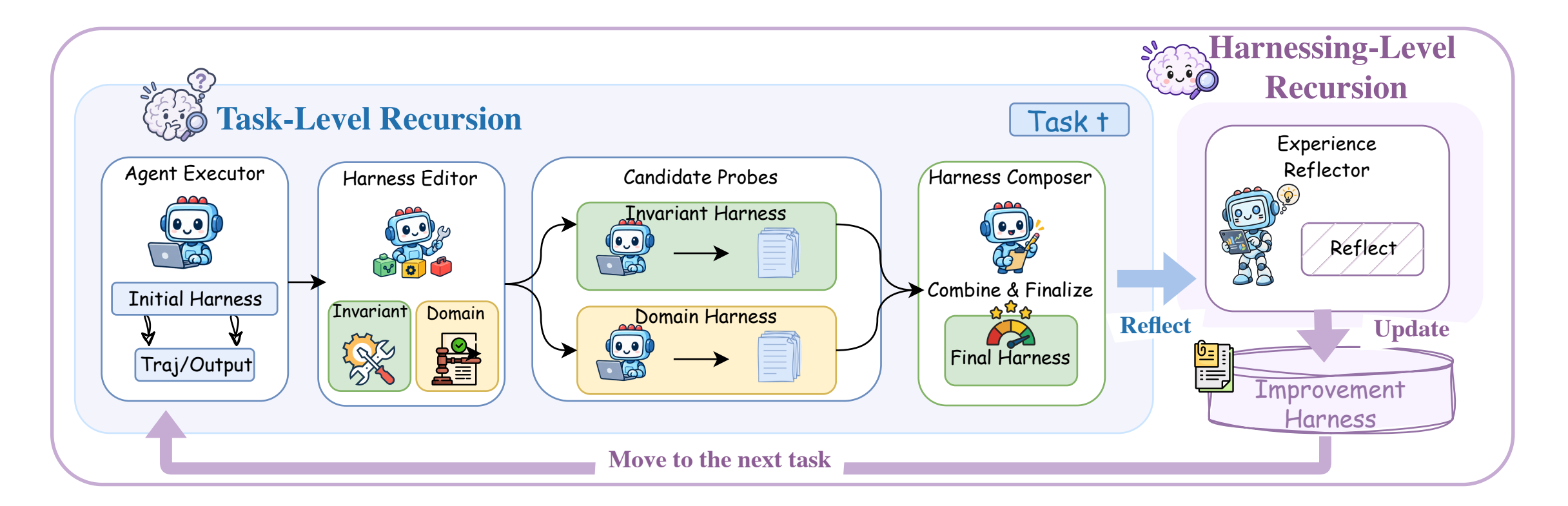
A plug-and-play framework for recursive agent harnessing in an open world. It connects two levels of recursion while keeping model weights fixed.
The two recursion levels are the point. Task-level recursion refines the execution harness for the current task through a contrastive Propose–Probe–Compose step. Harnessing-level recursion writes the adopted harness and evidence-supported lessons into a persistent improvement harness for future tasks.
Quick start
Three commands, then a demo that needs no model credentials.
The README targets Linux, Python 3.12 and uv. The demo runs both recursion modes with deterministic editors and real Python executions, so you can verify the install before touching Vertex AI.
Full installation guide, including the dependency traps →uv venv --python 3.12 .venv
source .venv/bin/activate
uv pip install -e '.[render]'Then run the credential-free demo
harness2-demo --output runs/demo --k 2The README does not document a GPU requirement. See the FAQ for that and the other setup questions.
What you can edit
The eight editable components
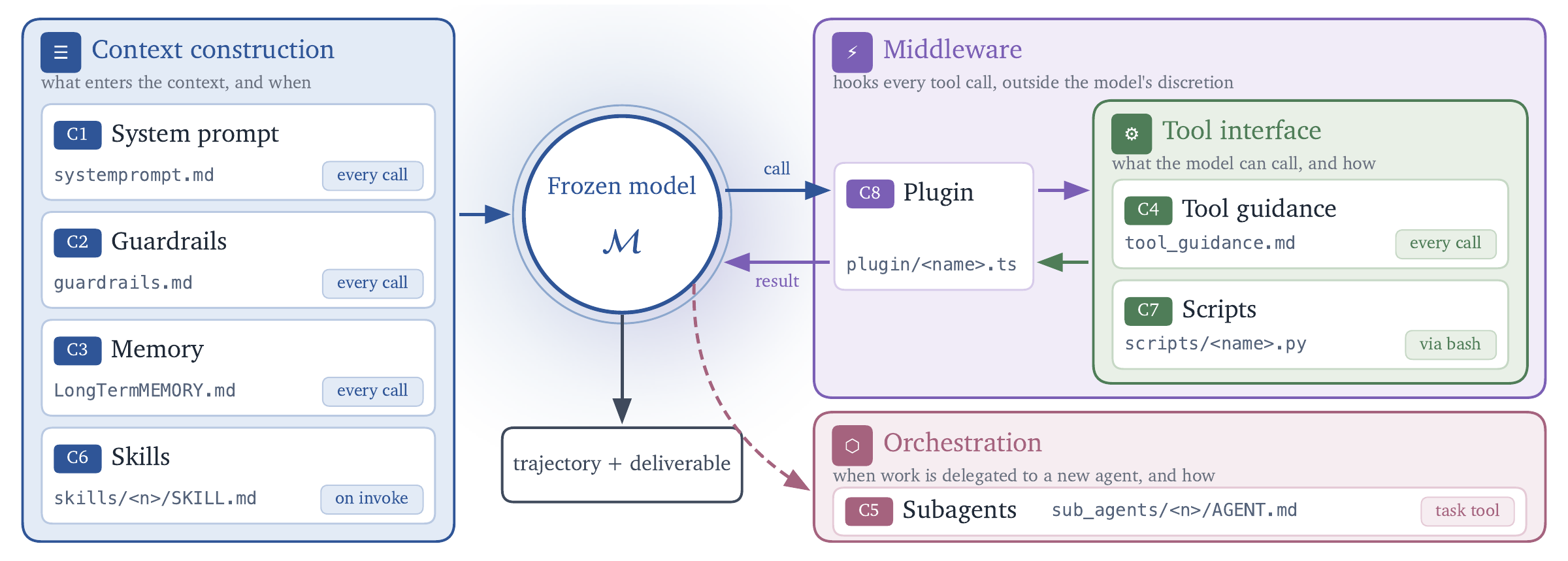
The model stays frozen. These are the pieces Harness² can change, grouped by their runtime role.
| Component | Group | What it controls |
|---|---|---|
| System prompt | Context construction | The agent's persona and top-level procedure — how the executor approaches a task before any individual tool is called. |
| Guardrails | Context construction | Constraints and checks on what the agent may do, and what it must verify before delivering. |
| Memory | Context construction | What the agent carries forward or retrieves across steps and tasks, as opposed to what is recomputed each time. |
| Tool guidance | Tool interface | How tools are described to the model, when each should be used, and what good input looks like. |
| Subagents | Orchestration | How work is split and delegated to specialized or parallel agents. |
| Skills | Context construction | Reusable procedures the agent can load for a class of tasks instead of rebuilding the method each time. |
| Scripts | Tool interface | Executable helpers that make deterministic operations repeatable instead of asking the model to perform them by reasoning. |
| Plugins | Middleware | Middleware that runs inside the tool loop and changes behavior across tools rather than one prompt. |
What one step changes
Gains over each base harness
Professional work
JobBench
up to +4.5
on points, relative to the base harness
Library grouped by the dataset’s occupation directories.
Legal work
LAB
up to +11.8 percentage points
on partial pass rate, relative to the base harness
Needs Pandoc and Poppler; reports Partial and All-pass.
Office, web and code
WorkBuddy-Bench
up to +11.5
on points, relative to the base harness
Requires Docker; use --subset office, web or code.
These are gains from a single Harness² step, not absolute scores, and not typical results. The README reports them as maximums across three professional benchmarks and four model–harness configurations, for GLM-5 and Gemini 3.5 Flash. Read the benchmark page before quoting them.
Go deeper
Three paths through the material
How the recursion actually works
Propose–Probe–Compose, the improvement harness, and how to choose between parallel and sequential runs.
ComparisonHarness² vs LangChain and DSPy
A layer-by-layer comparison: what gets optimized, what data you need, and which approach fits which problem.
PrimerWhat is an agent harness?
Start from the model-versus-harness distinction, then see why the same model can score differently under a different harness.
Before you install
Four questions people ask first
Do I need a GPU to run Harness²?
The official docs do not list a GPU requirement. The local demo runs on CPU with deterministic editors, and model-backed runs call the configured Vertex AI models.
Does Harness² fine-tune the model?
No. The README says Harness² keeps model weights fixed and improves the harness instead, so it is not SFT or weight fine-tuning.
Which models and executors are documented?
Reported results cover GLM-5 and Gemini 3.5 Flash. Setup docs describe Vertex Gemini executors and judges, with Vertex Claude or Gemini as the improver; OpenCode is the default executor and Codex is used with --substrate cx.
Is this an officially supported Google product?
No. The README states it is not an officially supported Google product and is not eligible for the Google Open Source Software Vulnerability Rewards Program.
Primary sources
Read the original material
This guide is a reading aid, not a substitute for the repository and paper. Commands, parameters and benchmark figures are quoted from the official sources.
How to read the numbers on this site
Every figure here is quoted from the official repository or the paper, and labelled with what it measures. Where the README is silent — GPU requirements, guardrail implementations, the skill file format — this site says so instead of filling the gap. If a number on this page disagrees with the repository, the repository is right.